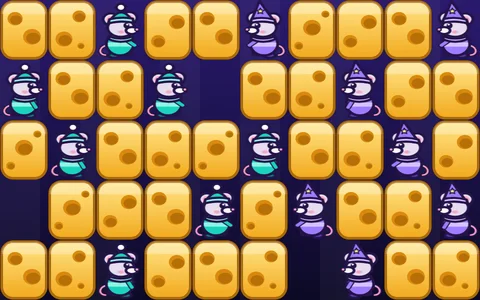
Cheddar Crossing
Slide the shelves. Guide your mice home.
▶ Play Cheddar CrossingFree · plays in your browser on phone or PC · no ads in the game
What is Cheddar Crossing?
Cheddar Crossing is a board game for one or two players set in a giant pantry. Two troops of twelve mice start on opposite sides, and each troop wants to reach the doorway at the far end first. The mice walk by themselves; your job is to slide the shelves of cheese so that a path opens up for yours and stays shut for theirs.
How a turn works
Every shelf column has a pole underneath it. Pick a pole under a column that holds one of your mice, then push that column up or down by one step. The top and bottom connect, so cheese that slides off one end comes back at the other. After your push, the mice move on their own: a mouse drops down if the space below is free, otherwise it steps forward, and it never climbs or turns back. Both troops walk after every push, so a push can help the rival as much as you.
Locked poles
You cannot push the column your opponent just pushed, and you cannot push the same column more than six times in a row. A padlock appears on any pole that is off limits. Pick another one.
The last-mice countdown
When each troop has just one mouse still in the pantry, a countdown begins: each side gets exactly eight more pushes. Whoever has the mouse that got farther along when the pushes run out wins. If both are the same distance from home, the game is a tie. A troop that gets all twelve mice home wins at once.
Three ways to play
Play the computer: pick one of six opponents, from Crumb, who plays gently and often misses the best move, up to Gruyère, who plans four pushes ahead and expects your best replies. Two players, one device: take turns on the same screen; a Pass the device screen hides the board between turns so nobody peeks at the plan, and you can switch it off. Online with a friend: one of you makes a room, shares the four-letter code or link, and the game starts when the other joins.
High scores
Only a win against the computer counts for the high score board. The fewer pushes you need, the more you score, with a bonus for the level you beat and for how far ahead you finish. Each hint you use takes a tenth off. Pass-and-play and online games never post a score.
Controls
Touch: tap a pole to select it, then tap Push up or Push down, or swipe the column up or down. The arrow buttons step from pole to pole. Mouse: click a pole, then click the push buttons or drag the column. Keyboard: left and right arrows pick a pole, up and down arrows push, H shows a hint and Escape opens the menu. The game plays fine in a normal browser window; a fullscreen button is there if you want it. Sounds and music can be switched on or off, and music starts switched off.
Tips
- Look at where your rearmost mouse is stuck, not just the front one. A single blocked mouse slows the whole troop.
- A push that lets the rival through can cost more than it gains. Check what opens up for them too.
- Pushing the same column a few times in a row can carry a mouse a long way, but watch the limit of six.
- In the countdown, every push counts. Save the last ones for moves that bring your leading mouse closer to the doorway.
- Not sure what to do? The hint button shows a good push, though it lowers your score.
If you get stuck
- A pole will not move
- It has a padlock: either your opponent just pushed that column, or you have pushed it six times in a row. Choose a different pole.
- Nothing seems to open
- Try pushing a column the other way. Because the shelves wrap around, a push down can bring a gap up from the top.
- The computer is too hard or too easy
- Start a new game and pick another opponent. Gentle and Friendly are good for learning.
Developer's notes
We wanted a board game that is easy to start and has real depth once you notice how the shelves wrap. The six computer levels were tuned by playing them against each other thousands of times, so each step up is a real step. There are no timers, daily tasks or things to buy. Ideas for changes are welcome through the ✎ button in the game.
Recent changes
- Opened with three ways to play and six computer levels.
- Added a high score board for wins against the computer.
- Added optional fullscreen, a first-time how-to and a hint button.
The full list is on our What's new page.
If you like this, try these
All trademarks belong to their owners; New Old Gamer is not affiliated with them.